Audio System DTC Troubleshooting: 1102
DTC 1102: USB Diag
■ Overview
If the audio unit detects a failure of the USB device that is connected to USB port A, the audio unit determines an abnormality and stores the DTC.
■ Inspection Outline
The components to be tested are indicated by a dotted line.
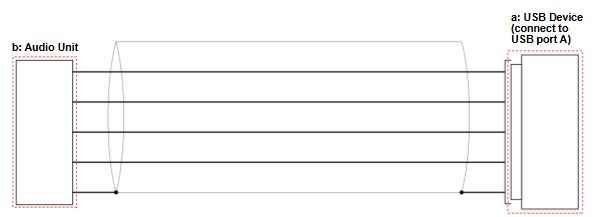
- Inspection Items Work Items
a USB Device USB Device Inspection
b Audio Unit
USB Device Inspection
NOTE: Since there is no direct method to test the inspection item, troubleshooting is performed using a known-good component.
■ Test Procedure
Connect a known-good USB device to USB port A and attempt to reproduce the failure.
■ Results
If the failure is reproduced, there is a problem with the audio unit.
If the symptom/DTC goes away, the USB device must be faulty.
■ Confirmation Procedure
1. Connect the USB device to USB port A.
2. Turn the vehicle to the ON mode.