Audio System DTC Troubleshooting: 2624
Honda HRV Hybrid DTC 2624: Center Display Diag
How to use this manual
Before you troubleshoot, review the How to Troubleshoot.
NOTE:
Check the connectors for poor connections or loose terminals.
■ Overview
If the audio unit indicates NG in the Center Display diagnosis (the Center Display icon is red in the System Links), the audio unit determines an abnormality and stores the DTC.
■ Inspection Outlin
- The components to be tested are indicated by a dotted line.
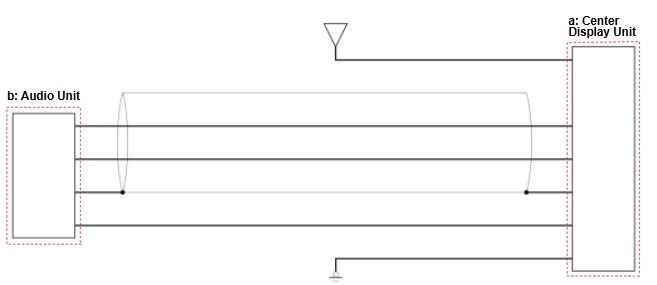
Inspection Items
- a.Center Display Unit: Center Display Unit Inspection
- b.Audio Unit: Audio Unit Inspection
a. Center Display Unit Inspection
NOTE:
Since there is no direct method to test the inspection item, troubleshooting is performed using a known-good component.
■ Test Procedure
Install a known-good center display unit and attempt to reproduce the failure.
■ Results
If the failure is reproduced, there is a problem with other related components.
If the symptom/DTC goes away, the center display unit must be faulty.
b.Audio Unit Inspection
■ Test Procedure
If the other inspection item(s) indicated a normal condition, then it is determined that the remaining audio unit is the cause.
■ Results
There is a problem with the audio unit.
■ Confirmation Procedure
1.Turn the vehicle to the ON mode.