Audio System DTC Troubleshooting: 2707
Honda HRV Hybrid DTC 2707: Mic Diag
How to use this manual
Before you troubleshoot, review the How to Troubleshoot.
NOTE:
Check the connectors for poor connections or loose terminals.
■ Overview
If the audio unit indicates NG in the Mic diagnosis (the Mic icon is red in the System Links), the audio unit determines an abnormality and stores the DTC.
■ Inspection Outline
The components to be tested are indicated by a dotted line.
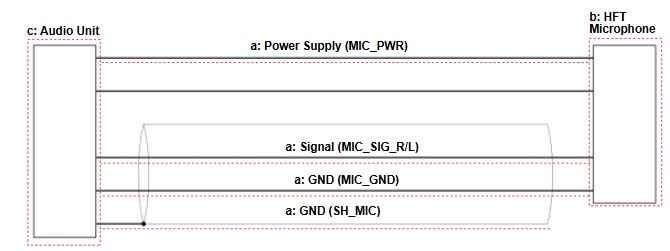
Inspection Items
- a.External Circuit: MIC_PWR, MIC_SIG_R/L, MIC_GND, SH_MIC Circuit Inspection
- b.HFT Microphone: HFT Microphone Inspection
- c. Audio Unit: Audio Unit Inspection
a. MIC_PWR, MIC_SIG_R/L, MIC_GND, SH_MIC Circuit Inspection
■ Test Procedure
- Preparation
Audio unit connector D (36P): disconnected
-HFT microphone 8P connector: disconnected - Procedure
Perform the inspection according to the following table.
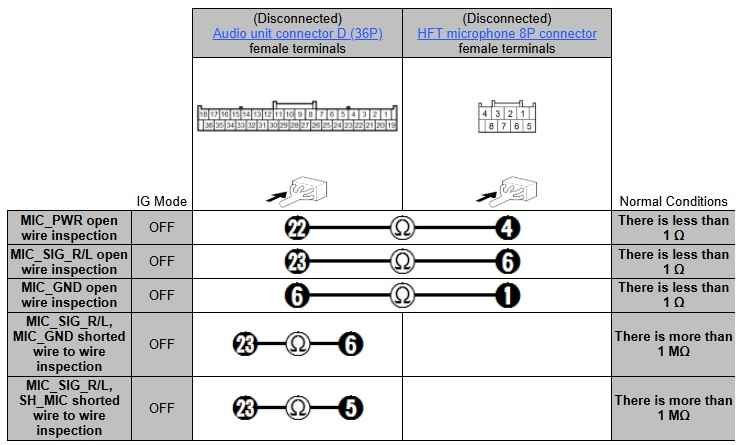
NOTICE:
Refer to the Open/Shorted Wire Inspection Description for the method to inspect the shorted circuit below, then start to inspect according to circumstances.

■ Results
If abnormal, there is a problem in the circuit.
b.HFT Microphone Inspection
NOTE:
Since there is no direct method to test the inspection item, troubleshooting is performed using a known-good component.
■ Test Procedure
Install a known-good HFT microphone and attempt to reproduce the failure.
■ Results
If the failure is reproduced, there is a problem with other related components.
If the symptom/DTC goes away, the HFT microphone must be faulty.
c.Audio Unit Inspection
■ Test Procedure
If the other inspection item(s) indicated a normal condition, then it is determined that the remaining audio unit is the cause.
■ Results
There is a problem with the audio unit.
■ Confirmation Procedure
Turn the vehicle to the ON mode.